The API Team recently released advanced filtering capabilities in the Person API to give more control on the results of the API. In addition to the features offered by the simple filters, advanced filters allow for detailed grouping and nesting of filter inputs, and more combinations of filtering that isn’t possible with original “simple” filters. Additionally, some new filter features will be added exclusively to advanced filters. For more information on upcoming features, see the API Team’s roadmap.
Overview
Filters are provided in a query parameter of a Person API request to control the results returned in the response body of an API call. The Person API has always supported filtering, but the new advanced filters allow for more complex filtering control. The existing simple filters will continue to be supported.
Here’s an example of a Person API request URL that includes an advanced filter. This filter will return people named Emily who have a current job.
https://api.wisc.edu/people?advancedFilter=and(equals(firstName, “Emily”),jobs(equals(current, true)))
The bulk export functionality of the Person API also supports advanced filtering.
Motivation
The original filtering capabilities of the Person API were designed based on the jsonapi.org specification. The purpose of using JSON:API was to take advantage of its detailed recommendations on structuring API data to allow for high control over API responses, such as reducing the number of API calls and minimizing the size of API payloads by dictating only which data is needed. JSON:API also has clients available in a number of programming languages, allowing Person API consumers to take advantage of an existing framework when integrating the API into their application.
Example
As the API grew, more use-cases arose that required control beyond what the simple filters are capable of. For example, consider these natural language statements in the context of an API filter:
- Give me all people who have at least one job with the supervisory organization “SO00001234” and title “Product Manager”.
- Give me all people where at least one of their jobs has the supervisory organization “SO00001234” and at least one of their jobs has the title “Product Manager”.
The first statement will return people who have at least one job with the supervisory organization “SO00001234” and title “Product Manager”, but the second statement will return people from the first statement in addition to people that have more than one job where one of the jobs is in SO00001234 and the other(s) have the title “Product Manager”. Simple filters took an opinionated approach on this distinction and were only able to return the results of the first statement.
Here are the two statements converted to advanced filters, respectively:
- jobs(and(equals(supervisoryOrganizationId, “SO00001234”), equals(title, “Product Manager”)))
- and(jobs(equals(supervisoryOrganizationId, “SO00001234”)), jobs(equals(title, “Product Manager”)))
The difference in ordering and grouping of the two advanced filters dictates how the filter is interpreted. This opens a high amount of possibilities for filtering control and enables new use-cases that weren’t possible with the simple filters.
Try It Yourself
If you already have access to the Person API or Mock Person API, you can use advanced filters today. To get started with the Person API, we recommend first trying out the Mock Person API. When you’re ready to integrate the Person API into your application/integration, follow these steps.
Feel free to email api@doit.wisc.edu with any questions.
Demo
To show the capabilities of the new advanced filters, I made a simple demo application with the help of AI. The application is a simple directory search and management hierarchy lookup tool. This demo app uses advanced filters to perform fuzzy matching on first and last name. It also uses a complex filter to exclude people with student affiliations as well as student employees. The app also searches as you type to show the benefits of calling the Person API directly from an application instead of copying data into a local database. Infinite scrolling is also used to automatically page through large result sets as you scroll.
Here’s a screen recording of the demo application.
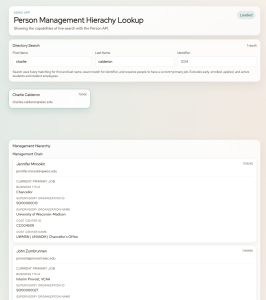
You can click on a person to get their supervisory chain and direct reports. Any of those people can be clicked on to get their supervisory chain and direct reports. This is done by finding the supervisor for a person’s job where active and current are both true. For direct reports, a search is done to find people whose current and active job has a supervisoryOrganizationId that is in their supervisor’s managedSupervisoryOrganizationIds list.
Here’s the filter that’s being used in the initial person search.
and(
jobs(
and(
equals(current, true),
equals(primary, true)
)
),
not(
affiliations(
equals(
affiliation,
[
“Employees – Active Student”,
“Students – Applied for Admissions”,
“Students – Early”,
“Students – Enrolled”,
“Inactive”
]
)
)
),
identifiers(equals(value, “{identifier}”)),
fuzzy(firstName, “{firstName}”),
fuzzy(lastName, “{lastName}”)
)
The demo isn’t hosted on any website, but you can run it locally on your own computer. You can also use it with the Mock Person API, although our mock data doesn’t have very realistic supervisory hierarchy data. However, it will still be a good demonstration of live search and infinite scrolling. Here is the git repository.